How Zoho Books Works
The product runs from a web interface plus native mobile apps for iOS and Android, and a Windows desktop client for offline workflows. Users create organizations, set up chart of accounts, connect bank feeds, and configure taxes before starting day-to-day tasks such as creating invoices, recording bills, and reconciling transactions.
Typical workflows include sending automated recurring invoices, matching payments imported from connected bank accounts, and running project timers that convert time entries into billable invoices. The platform supports role-based access for accountants and clients, and includes a customer portal to let clients view invoices, accept estimates, and pay online through supported gateways.

Core Capabilities of Zoho Books
Zoho Books features
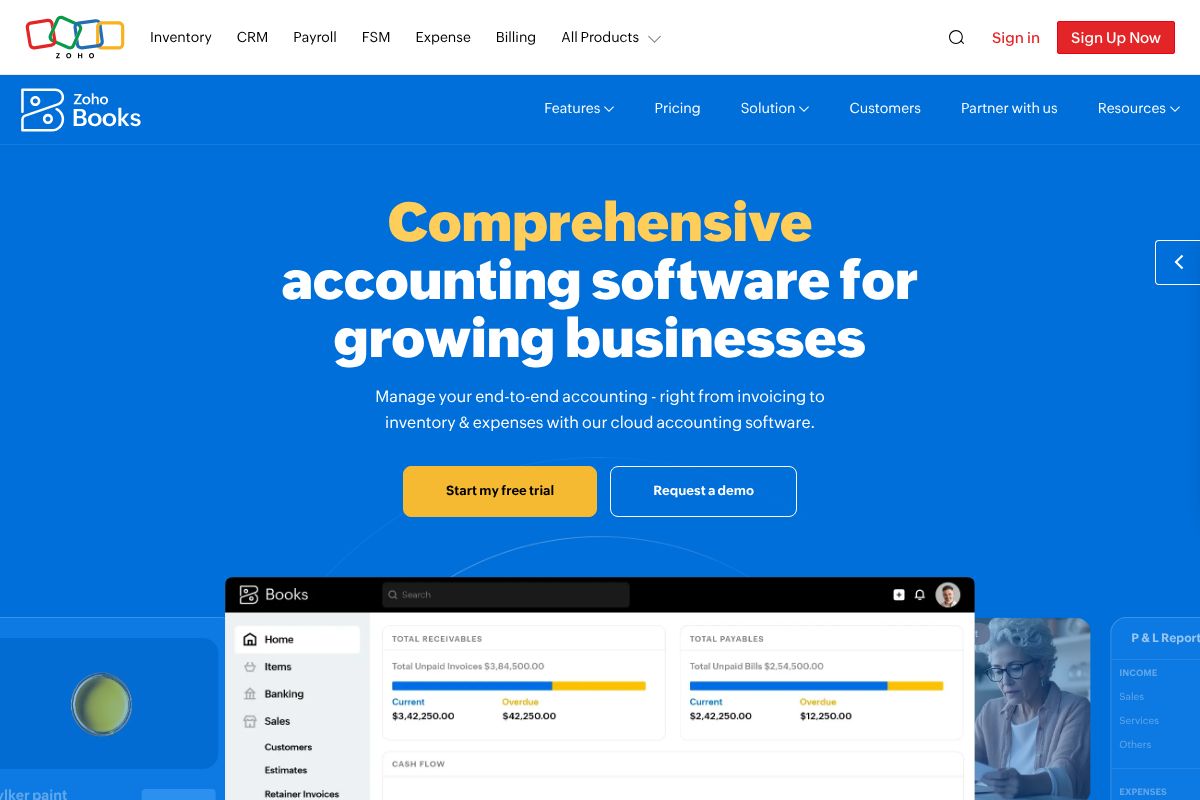
Zoho Books groups standard accounting features with business workflow and automation tools. Core capabilities include invoicing, expense tracking, bank reconciliation, inventory accounting, project time tracking, and financial reporting. The product also highlights automation rules and a customer portal for collaboration.
Invoicing and Quotes
Create branded invoices and estimates, schedule recurring invoices, and send automated payment reminders. The system supports multiple currencies and tax rates, and lets you convert accepted estimates to invoices with a single click.
Bank Reconciliation
Connect bank and credit card accounts to import transactions automatically, match them to recorded entries, and reconcile statements. The reconciliation process reduces manual bookkeeping time and improves accuracy for cash-flow reporting.
Expense Management
Capture expenses via mobile receipt upload, categorize spending, and bill expenses to projects or customers. Expense workflows include approval routing and integration with vendor bills for unified payables management.
Inventory Accounting
Track stock levels, manage SKUs, and handle multi-location inventory with cost tracking. Inventory features integrate with sales orders and purchase orders so accounting and stock levels remain synchronized.
Projects and Time Tracking
Log time against projects, set hourly rates, and convert time entries into invoices for client billing. Project costing and profitability reporting help teams decide which engagements are most valuable.
Automation and Workflow Rules
Automate routine tasks such as invoice reminders, recurring transactions, and approval flows. Automation rules reduce repetitive work and enforce consistent accounting treatments across the organization.
Reporting and Compliance
Generate standard financial reports including profit and loss, balance sheet, cash flow, and custom reports for taxes. Built-in tax features and country-specific compliance options simplify filing and year-end activities.
Customer Portal and Payments
Provide customers a secure portal to view invoices, accept estimates, and make payments through multiple gateways. Integrated payment processing shortens collections cycles and improves cash flow visibility.
API and Integrations
Zoho Books offers a developer API for programmatic access to invoices, contacts, items, and transactions; see the API documentation for endpoints and examples. The product integrates with other Zoho apps, major payment gateways, and third-party automation tools to connect accounting into broader business workflows.
With Zoho Books you get a unified accounting platform that handles everyday bookkeeping and ties closely to sales, inventory, and projects for businesses that need more than basic invoicing.
Zoho Books Pricing
Pricing Overview for Zoho Books
Zoho Books offers a range of pricing plans to accommodate various business needs. Below is a detailed breakdown of the available pricing tiers.
Pricing Plans
-
Free Plan:
This plan is available for businesses with annual revenue of less than $50,000. It includes essential features to manage your finances.
-
Standard Plan:
Priced at $15 per organization per month when billed annually. This plan includes additional features such as invoicing, expense tracking, and reporting.
-
Professional Plan:
Available for $40 per organization per month when billed annually. This plan offers advanced features including project tracking and time tracking.
-
Premium Plan:
Costing $60 per organization per month when billed annually. This plan includes all features from the Professional Plan, plus advanced analytics and multi-currency support.
Free Trial
Zoho Books offers a 14-day free trial for all paid plans. This allows potential users to explore the software's features without any commitment.
Enterprise/Custom Pricing
For larger organizations or those with specific needs, Zoho Books provides custom pricing options. Interested users can contact the sales team for tailored solutions that fit their business requirements.
This pricing was last checked by our team on February 1, 2026
What is Zoho Books Used For?
Zoho Books is used to manage core accounting operations: invoicing clients, recording vendor bills, reconciling bank accounts, and producing financial statements. It suits businesses that need reliable bookkeeping plus a way to link sales, inventory, and projects to finances.
Small service businesses use Zoho Books for time tracking and client billing, retailers use its inventory and sales order features, and accounting firms use its collaboration tools to manage client books remotely. It also supports tax tracking and compliance workflows for jurisdictions where Zoho provides tailored tax configurations.
What Zoho Books Does Well and Where It Falls Short
What It Does Well
User-Friendly Interface
Zoho Books features an intuitive web interface and mobile apps for easy access.
Automated Workflows
The platform allows for automated recurring invoices and payment matching.
Role-Based Access
Supports role-based access for different users, enhancing security and collaboration.
Customer Portal
Clients can view invoices and make payments through a dedicated portal.
Where It Falls Short
Limited Offline Functionality
While it offers a desktop client, offline capabilities may be limited compared to competitors.
Integration Restrictions
Integrations with third-party applications may not be as extensive as other accounting tools.
Complex Pricing Structure
Pricing tiers can be complex, potentially making it difficult to determine the best fit.
Frequently asked questions about Zoho Books
What is Zoho Books used for?
Zoho Books is used for small business accounting, invoicing, and financial reporting. It consolidates billing, bank reconciliation, expense tracking, inventory tracking, and project billing into a single platform.
Does Zoho Books integrate with other Zoho apps?
Yes, Zoho Books integrates tightly with other Zoho applications. Native connections to Zoho CRM, Zoho Inventory, and Zoho Payroll allow data to flow between sales, inventory, and accounting modules.
Can Zoho Books handle multi-currency transactions?
Zoho Books supports multi-currency operations. You can create invoices, accept payments, and maintain accounts in multiple currencies with exchange rate handling.
Is there an API for Zoho Books?
Yes, Zoho Books provides a public REST API. The API documentation explains endpoints, authentication, and examples for integrating external systems.
How do I compare Zoho Books pricing plans?
Zoho Books offers tiered subscription plans with monthly and annual billing and enterprise options. For the most accurate plan features and rates, review the current pricing options on Zoho's site.
Final verdict: Zoho Books
Zoho Books is a feature-rich accounting application that covers the full bookkeeping lifecycle, from invoicing and bank reconciliation to inventory and project billing. It stands out when you need accounting tightly integrated with CRM and other business apps from the same vendor, and when automation and workflow rules can reduce manual bookkeeping.
Compared to QuickBooks Online, Zoho Books provides similarly deep core accounting capabilities with particularly strong native integrations across a single app family, often at a more conservative price point for teams that adopt multiple Zoho products. For businesses already using Zoho apps, Books delivers practical advantages in integration and workflow continuity; for companies heavily invested in third-party ecosystems, QuickBooks or Xero may offer a larger add-on marketplace.